10 Critical Questions About DC Fans: Selection, Applications & Troubleshooting for Electronics
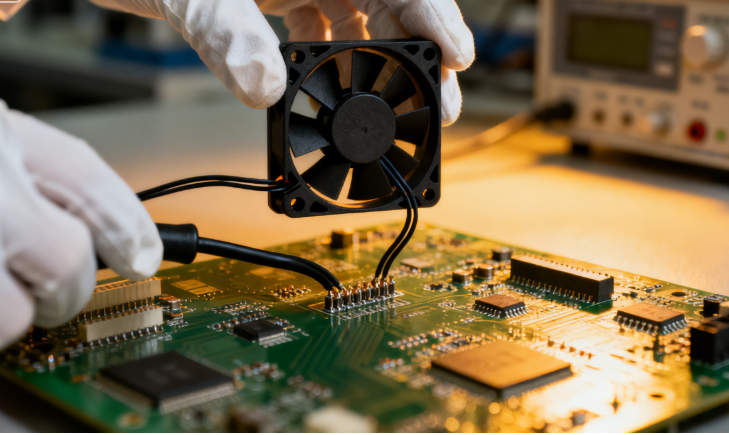
10 Critical Questions About DC Fans: Selection, Applications & Troubleshooting for Electronics
- 1. Brushless vs Brushed DC Fans: Key Differences for Electronic Devices
- 2. Voltage Selection (12V/24V/48V) for Industrial Equipment DC Fans
- 3. DC Cooling Fans vs AC Fans: Advantages in Small Electronic Enclosures
- 4. DC Fan Specifications for Automotive Electronics (ADAS/Infotainment)
- 5. Reducing DC Fan Noise in Consumer Electronics (PC/Home Appliances)
- 6. Waterproof DC Fans for Outdoor IoT Devices: Recommended IP Rating
- 7. Matching DC Fan Airflow/Static Pressure with Heat Sink Requirements
- 8. DC Fan Failure Causes & Prevention in Industrial Control Systems
- 9. PWM-Controlled vs Voltage-Regulated DC Fans: Compatibility & Replacement
- 10. DC Fan Sizes (80mm/120mm/140mm) for Server Racks & Data Centers
DC fans (direct current fans) are the backbone of thermal management in nearly every electronic device—from industrial control systems and data centers to consumer gadgets and automotive electronics. Their energy efficiency, compact size, and adjustable speed make them indispensable for preventing overheating and ensuring long-term reliability.
Yet, with countless variants (brushless vs. brushed, 12V vs. 24V, waterproof vs. standard) and niche use cases, choosing the right DC fan or solving common issues can be daunting. Below, we answer the 10 most searched questions about DC fans—tailored to help engineers, procurement professionals, and hobbyists make informed decisions and optimize their projects.
1. What Are the Key Differences Between Brushless DC Fans and Brushed DC Fans for Electronic Devices?
The core distinction lies in motor design, performance, and longevity—critical factors for electronic device reliability:
| Feature | Brushless DC (BLDC) Fans | Brushed DC Fans |
|---|---|---|
| Motor Design | Uses electronic commutation (no physical brushes) | Relies on mechanical brushes + commutator |
| Lifespan | 50,000–100,000 hours (ideal for long-running devices) | 1,000–5,000 hours (brushes wear out over time) |
| Noise Level | Low (30–45 dB) – no brush friction | High (45–60 dB) – brush contact causes noise |
| Energy Efficiency | 80–90% efficient | 50–60% efficient |
| Speed Control | Precise (PWM/voltage regulation) | Limited (voltage-only adjustment) |
| Cost | Higher upfront | Lower upfront |
Best For:
- Brushless DC Fans: Servers, industrial PLCs, smart home devices, and automotive electronics (require long lifespan and low noise).
- Brushed DC Fans: Budget-friendly, short-term projects (e.g., DIY gadgets, temporary cooling) or devices with low usage cycles.
2. How to Select the Right Voltage (12V/24V/48V) DC Fans for Industrial Equipment?
Voltage selection depends on three key factors: power availability, thermal requirements, and energy efficiency—critical for industrial environments (e.g., factories, data centers) where equipment runs 24/7.
Step-by-Step Selection Guide:
- Match the system voltage: Industrial equipment typically uses 12V (small controllers), 24V (conveyors, sensors), or 48V (server racks, large machinery). Using a fan with mismatched voltage (e.g., 12V fan on a 24V system) will burn out the motor or cause insufficient airflow.
- Prioritize efficiency for high-power systems: 48V DC fans are 15–20% more energy-efficient than 12V/24V models, making them ideal for data centers or factories aiming to reduce power consumption.
- Balance airflow vs. noise: Higher voltage (24V/48V) fans deliver more airflow (CFM) at lower RPM than 12V fans, reducing noise in noise-sensitive industrial areas (e.g., control rooms).
- Account for voltage fluctuations: Industrial power supplies often have voltage spikes—choose a fan with a ±10% voltage tolerance (e.g., a 24V fan that operates at 21.6V–26.4V) to avoid failure.
Example Use Cases:
- 12V: Small industrial sensors, portable test equipment.
- 24V: Factory automation (PLCs, motor drives), HVAC control panels.
- 48V: Data center server racks, large-scale industrial cooling systems.
3. What Are the Advantages of DC Cooling Fans Compared to AC Fans in Small Electronic Enclosures?
Small electronic enclosures (e.g., IoT gateways, router boxes, medical device modules) demand compact, efficient cooling—and DC cooling fans outperform AC fans in this niche for four key reasons:
- Compact size: DC fans are 30–50% smaller than AC fans with equivalent airflow (e.g., a 40mm DC fan delivers 10 CFM, while an AC fan needs to be 60mm to match). This fits tight enclosure footprints.
- Lower power consumption: DC fans use 40–60% less energy than AC fans. Critical for battery-powered IoT devices or enclosures with limited power budgets.
- Precise speed control: DC fans support PWM (Pulse-Width Modulation) or voltage-based speed adjustment, allowing you to reduce RPM (and noise) when cooling demands are low. AC fans run at fixed speed, wasting energy.
- Quieter operation: DC fans operate at 30–40 dB at full speed, while AC fans of similar size hit 50–60 dB—essential for consumer electronics or office-use devices.
Exception:
Use AC fans only if the enclosure is connected to a constant AC power source (no battery) and size/energy efficiency are not priorities (e.g., large industrial enclosures with ample space).
4. What Specifications Should DC Fans for Automotive Electronics Meet (e.g., Temperature, Vibration)?
Automotive electronics (ADAS systems, infotainment units, engine control modules) face extreme conditions—DC fans must meet strict automotive-grade standards to survive:
Key Specifications:
- Temperature range: -40°C to +125°C (AEC-Q200 compliant). Engine bays and under-hood electronics experience rapid temperature swings, so fans must tolerate freezing cold and high heat.
- Vibration resistance: 10–2000 Hz, 30g acceleration (per ISO 16750-3). Road vibrations can damage loose components—automotive DC fans have reinforced motor shafts and shock-absorbent housings.
- Water/dust resistance: IP65 or higher rating. Spills, rain, and road dust can infiltrate enclosures—waterproof DC fans prevent short circuits.
- EMI compliance: Meets CISPR 25 Class 3. Automotive electronics are sensitive to electromagnetic interference (EMI)—DC fans with shielded motors avoid disrupting GPS, radar, or infotainment systems.
- Longevity: 50,000+ hours lifespan. Cars stay in use for 10+ years—fans must endure constant operation without failure.
Example:
ADAS cameras use 12V brushless DC fans with IP67 rating, -40°C to +105°C temperature range, and low EMI to avoid interfering with sensor data.
5. How to Reduce Noise from DC Fans in Consumer Electronics (e.g., PC, Home Appliances)?
Noise is a top complaint in consumer electronics—here are 5 actionable strategies to quiet DC fans without sacrificing cooling performance:
- Use PWM speed control: Most modern consumer devices (PCs, smart TVs) support PWM—reduce fan RPM when the device is idle (e.g., 800 RPM vs. 1500 RPM). This cuts noise by 30–50% (noise level scales with RPM).
- Choose low-noise fan models: Look for fans with “quiet” or “ultra-quiet” labels—these have aerodynamic fan blades (curved design reduces turbulence) and rubber damping feet (absorbs vibration).
- Optimize airflow paths: Ensure the fan has unobstructed intake/exhaust (no wires or components blocking airflow). Poor airflow forces the fan to run at higher RPM, increasing noise.
- Add vibration dampeners: Mount the fan with rubber gaskets or anti-vibration brackets (instead of direct screw mounting). This prevents fan vibration from transferring to the device chassis (a major noise source).
- Clean fans regularly: Dust buildup on blades increases turbulence and RPM—vacuum or brush dust off fans every 6–12 months (critical for PCs and air purifiers).
Pro Tip:
For PCs, use fan curve software (e.g., Corsair iCUE, NZXT CAM) to set custom RPM thresholds—e.g., run fans at 50% speed when CPU temperature is <50°C, and ramp up only when needed.
6. Are Waterproof DC Fans Suitable for Outdoor IoT Devices? What IP Rating Is Recommended?
Yes—waterproof DC fans are essential for outdoor IoT devices (e.g., weather sensors, solar-powered gateways, outdoor security cameras) that face rain, humidity, or splashes. The key is choosing the right IP (Ingress Protection) rating:
IP Rating Explained for DC Fans:
- First digit (solid particle protection): 6 = dust-tight (no dust enters the fan motor).
- Second digit (liquid protection): 5 = protection against low-pressure water jets; 6 = high-pressure water jets; 7 = temporary immersion (up to 1m); 8 = continuous immersion (depth >1m).
Recommended IP Ratings for Outdoor IoT:
- IP65: Ideal for most outdoor devices (e.g., wall-mounted sensors, solar inverters). Protects against rain, splashes, and dust.
- IP67: For devices exposed to heavy rain, puddles, or temporary submersion (e.g., ground-mounted weather stations).
- IP68: Rarely needed for IoT devices—reserved for underwater applications (e.g., marine sensors).
Critical Considerations:
- Ensure the fan’s power connector is also waterproof (matching IP rating) to avoid water ingress through wires.
- Choose brushless DC fans—brushed fans have exposed commutators that corrode in humid environments.
7. How to Match the Airflow and Static Pressure of DC Fans with Heat Sink Requirements?
Mismatched airflow (CFM, cubic feet per minute) and static pressure (mmH2O) lead to poor cooling—follow this formula to ensure compatibility with heat sinks:
Step 1: Calculate Heat Sink Cooling Requirement
First, determine the heat load (in watts) your heat sink needs to dissipate:
Heat Load (W) = Device Power Consumption (W) × Heat Dissipation Ratio
(Example: A 20W IoT module with 80% heat dissipation = 16W heat load.)
Step 2: Select Airflow (CFM)
Use the heat sink’s “CFM per Watt” rating (provided by the manufacturer):
Required CFM = Heat Load (W) × CFM per Watt
(Example: 16W × 0.8 CFM/W = 12.8 CFM → choose a fan with ≥13 CFM.)
Step 3: Match Static Pressure
Heat sinks with dense fins (e.g., for high-power devices) require higher static pressure to push air through the gaps:
- Low static pressure (1–3 mmH2O): Suitable for heat sinks with wide fins (gap ≥2mm) → e.g., consumer electronics.
- Medium static pressure (3–6 mmH2O): For heat sinks with narrow fins (gap 1–2mm) → e.g., industrial controllers.
- High static pressure (6+ mmH2O): For dense heat sinks (gap <1mm) → e.g., server CPUs, high-power LEDs.
Example:
A server CPU heat sink with 0.8mm fin gaps and 50W heat load requires a DC fan with 40 CFM airflow and 8 mmH2O static pressure.
8. What Are the Common Failure Causes of DC Fans in Industrial Control Systems, and How to Prevent Them?
Industrial control systems (PLCs, SCADA devices, motor drives) rely on DC fans for 24/7 cooling—here are the top 5 failure causes and prevention strategies:
1. Dust Infiltration
- Cause: Industrial environments have high dust levels—dust clogs fan blades and motor bearings, increasing friction and overheating.
- Prevention: Use IP65-rated fans (dust-tight), install pre-filters on enclosures, and schedule monthly dust cleaning.
2. Voltage Spikes
- Cause: Industrial power grids experience voltage surges (e.g., from machinery startup) that damage fan motors.
- Prevention: Install surge protectors in the power supply, choose fans with ±15% voltage tolerance, and use regulated power supplies.
3. Vibration Damage
- Cause: Factory machinery generates vibration that loosens fan mounting screws or damages motor shafts.
- Prevention: Use anti-vibration brackets, mount fans with rubber gaskets, and choose fans with reinforced motor housings.
4. Overheating
- Cause: Fans are undersized (insufficient CFM) or placed in hot zones (e.g., near furnaces).
- Prevention: Size fans for 20% excess airflow, position fans away from heat sources, and use temperature-controlled PWM fans.
5. Bearing Wear
- Cause: Brushed fans or low-quality brushless fans have worn bearings after 10,000+ hours.
- Prevention: Use brushless DC fans with sealed ball bearings (vs. sleeve bearings) and replace fans every 5 years as preventive maintenance.
9. Can PWM-Controlled DC Fans Replace Voltage-Regulated DC Fans? What Are the Compatibility Requirements?
Yes—PWM-controlled DC fans can replace voltage-regulated fans in most applications, offering better speed control and energy efficiency. However, ensure these compatibility requirements are met:
1. Controller Compatibility
- Voltage-regulated fans use variable input voltage (e.g., 5V–12V) to adjust speed—PWM fans require a PWM signal (typically 5V logic, 20kHz frequency) from a controller (e.g., microcontroller, fan hub).
- If your system lacks a PWM controller, use a PWM-to-voltage adapter (available from electronics suppliers) to convert the signal.
2. Power Supply Matching
- PWM fans have a fixed input voltage (e.g., 12V) — ensure your power supply delivers this voltage (vs. variable voltage for regulated fans).
- Avoid overclocking PWM fans beyond their rated voltage (e.g., running a 12V PWM fan at 15V) — this damages the motor.
3. Speed Range Compatibility
- PWM fans have a minimum RPM (e.g., 300 RPM) — ensure this is low enough for your idle cooling needs (vs. voltage-regulated fans, which can run at near-zero RPM).
- For critical applications (e.g., medical devices), test the PWM fan’s speed range to confirm it matches the system’s cooling requirements.
Best For Replacement:
Servers, PCs, industrial controllers, and consumer electronics—PWM fans offer more precise speed control and energy savings. Avoid replacement in legacy systems without PWM controllers (unless using an adapter) or low-power devices (e.g., battery-powered sensors) where voltage regulation is simpler.
10. What Size (80mm/120mm/140mm) DC Fans Are Best for Server Racks and Data Center Cooling?
Server racks and data centers require high airflow, low noise, and efficient cooling—here’s how to choose the right DC fan size:
Key Size Comparison:
| Fan Size | Airflow (CFM) | Static Pressure (mmH2O) | Noise Level (dB) | Best For |
|---|---|---|---|---|
| 80mm | 20–40 CFM | 4–8 mmH2O | 35–45 dB | 1U server racks (tight space) |
| 120mm | 40–80 CFM | 3–6 mmH2O | 25–35 dB | 2U–4U server racks, rack enclosures |
| 140mm | 60–120 CFM | 2–5 mmH2O | 20–30 dB | Large data center aisles, 4U+ racks |
Selection Guidelines:
- 1U Server Racks: Use 80mm fans—they fit the narrow 1U (1.75-inch) height. Prioritize high static pressure (6+ mmH2O) to push air through dense server components.
- 2U–4U Racks: 120mm fans are the sweet spot—balance of airflow, low noise, and size. They’re the most common choice for data centers due to versatility.
- Large Racks/Aisles: 140mm fans deliver maximum airflow at the lowest noise—ideal for cooling multiple racks or data center hot aisles. Use them in ceiling-mounted or floor-mounted fan arrays.
Pro Tip:
Use a combination of front intake and rear exhaust fans (e.g., 4x120mm fans in a 4U rack) to create positive pressure, ensuring uniform cooling across all servers.

Brushless DC Cooling Fans (12V/24V)
50,000+ hour lifespan, low noise (30–45 dB), ideal for industrial equipment and consumer electronics.
Automotive-Grade DC Fans (AEC-Q200)
-40°C to +125°C temp range, IP65 rating, 30g vibration resistance for ADAS and车载 electronics.

Waterproof DC Fans (IP65/IP67)
Dust-tight, water-resistant, perfect for outdoor IoT devices, solar inverters, and weather sensors.
PWM-Controlled DC Fans (80mm/120mm/140mm)
Precise speed control, energy-efficient, compatible with server racks and data center cooling.
High Static Pressure DC Fans
6+ mmH2O static pressure, ideal for dense heat sinks in high-power industrial controllers and CPUs.
10 Critical Questions About SMD Capacitors for PCBA Boards — Design, Production, Repair & Reliability
10 Critical Questions About Chip Capacitors & Their Closest Alternatives (MLCC, Tantalum, Aluminu
Related Article